
AI media generation for real editing workflows.
For editors who see the shot before it exists.
Generate missing shots, temp visuals, voiceover, and AI audio inside DaVinci Resolve Studio. Finished media goes directly to the media pool or timeline.
Join the waitlist for launch updates, demo releases, and early access. Reelizer uses your own Kie.ai and ElevenLabs API keys.
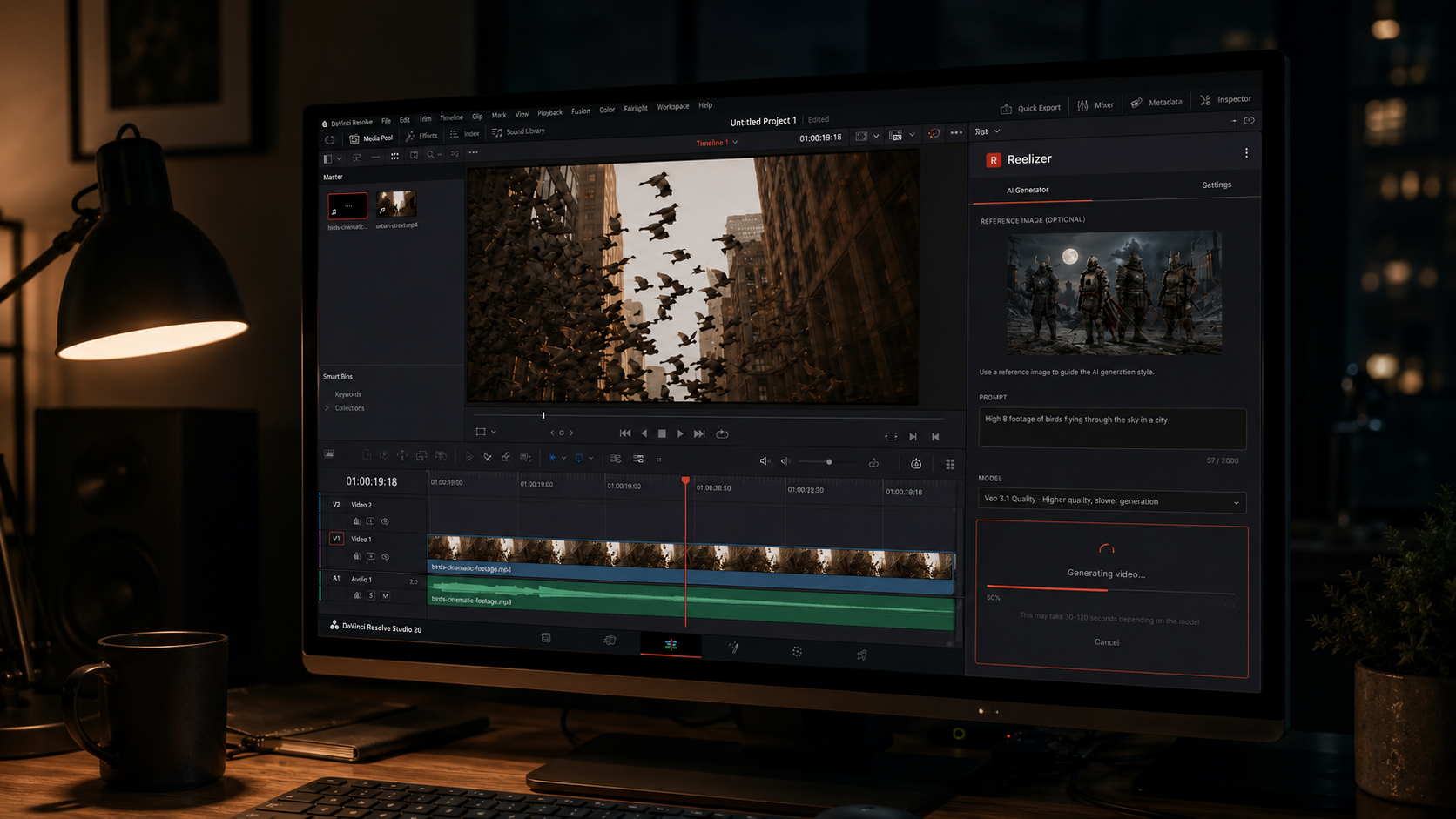
Generating AI media shouldn't mean leaving your edit.
Every browser-based generation workflow adds the same overhead. Reelizer removes it.
The browser workflow
- Export a frame from Resolve
- Open a browser tab
- Upload the frame as reference
- Enter your prompt
- Wait for generation
- Download the result
- Import into Resolve
- Organize the media
- Place it on the timeline
With Reelizer
- Grab a frame from the timeline
- Enter your prompt
- Generate
- Insert
Reference. Generate. Insert.
-
Reference your edit
Capture a frame directly from your timeline, or drag in a reference image from your desktop. Use what you already have.
-
Generate media
Describe what you need. Prompt video, temp visuals, voiceover, or AI audio using supported providers, without leaving Resolve.
-
Insert where it belongs
Send results to the media pool, at the playhead, at the original generation position, or at the timeline end. Reelizer places the clip; you keep cutting.
Built for editing workflows.
Every feature is organized around how an edit actually works, not around the technology behind it.
Generate missing visuals
- Text-to-video generation
- Image and frame reference for generation
- Timeline frame capture
- Drag-and-drop reference images
- Duration and aspect ratio controls where supported
- Audio generation with compatible models
Create temp voiceover
- ElevenLabs text-to-speech
- Browse and preview voices
- Accent and gender filters
- Stability and clarity controls
- Preview before inserting
Stay close to the timeline
- Insert at playhead
- Insert at original generation position
- Append to timeline end
- Send to media pool
- Smart track placement
- AI Generated Media Pool folder
Work faster across sessions
- Pin favorite models and voices
- Settings persist across sessions
- Check provider credit balances
- Cancel in-progress generations
- Completion notifications
- Secure API key storage
Designed to stay out of the way.
Reelizer is built to fit inside your workflow without becoming a new one. API keys are stored using OS-level encryption via Electron safeStorage. Generations route directly through your provider accounts, not through Reelizer servers. And because it runs inside Resolve, you stay in the environment where the edit actually lives.
You can continue cutting while a generation runs. When the clip is ready, a notification appears. Dismiss it, preview it, or insert it without stopping what you were doing.
- API key security
- Stored via Electron safeStorage. OS-level encryption. Keychain on Mac, Credential Store on Windows.
- Request routing
- Requests go directly to Kie.ai and ElevenLabs from your machine. Nothing is proxied through Reelizer servers.
- Continuous editing
- Generations run in the background. You keep cutting. A notification appears when the clip is ready.
- Native dark theme
- Reelizer matches DaVinci Resolve's dark UI. No jarring light panel in a dark studio.
Multiple models. One interface.
Reelizer connects to supported providers using your own API keys. The workflow stays the same regardless of which model you choose.
Video generation
Via Kie.ai
- Kling
- Wan
- Veo
- Runway
- Grok
- Additional Kie.ai-supported models
Supported model list subject to change. Verify current availability via Kie.ai.
Voiceover
Via ElevenLabs
- ElevenLabs text-to-speech
- Full voice library access
- Accent and gender filters
Watch the workflow.
A rough cut with a missing shot. Reelizer open inside Resolve. From reference frame to timeline clip, without touching a browser.
Screen-recorded workflow demo: a rough cut in DaVinci Resolve Studio missing an establishing shot. The editor opens Reelizer from the panel, captures a frame from the timeline as a visual reference, types a text prompt describing the needed shot, and starts the generation. The editor continues cutting on the main timeline while the generation runs in the background. A notification appears when the clip is ready. The editor clicks Insert. The generated clip drops into the timeline at the original position. Total runtime approximately 90 seconds.
One-time purchase. Bring your own keys.
Reelizer will launch as a one-time purchase. No subscription. No bundled credits. AI generation usage is billed directly through your Kie.ai and ElevenLabs accounts.
The price will be posted here when the product is available for sale.
- One-time purchase after release
- 2 activations per license
- Bring your own Kie.ai API key
- Bring your own ElevenLabs API key
- No Reelizer subscription
- No bundled generation credits
Using DaVinci Resolve (free) or a different NLE? A lighter version may come later. Join the interest list.
Frequently asked.
Do I need DaVinci Resolve Studio?
Yes. The full Reelizer plugin is built for DaVinci Resolve Studio because timeline insertion and frame capture rely on Studio-supported workflows. A lighter version may come later for other NLEs.
Do I need my own API keys?
Yes. Reelizer uses a bring-your-own-key model. You connect your own Kie.ai and ElevenLabs API keys. Provider usage is billed through those services directly.
Is Reelizer a subscription?
No. Reelizer is planned as a one-time purchase. AI generation usage is paid directly through your provider accounts.
Does Reelizer include AI generation credits?
No. Reelizer does not bundle AI generation credits. It connects your editing workflow to supported providers using your own accounts.
Where are my API keys stored?
API keys are stored using OS-level encryption via Electron safeStorage: Keychain on Mac, Credential Store on Windows. Reelizer never stores your keys in plaintext.
Does Reelizer send requests through its own servers?
No. Reelizer communicates directly with Kie.ai and ElevenLabs using your API keys. Nothing is routed through Reelizer servers.
Can I keep editing while a generation runs?
Yes. Reelizer is designed so generations run while you continue working in Resolve. A notification appears when the clip is ready.
Where does generated media go?
You can send results to the media pool, insert at the playhead, insert at the original generation position, or append to the end of the timeline. Outputs are organized in an AI Generated Media Pool folder.
Which providers and models are supported?
Initial support includes Kie.ai-powered video models (Kling, Wan, Veo, Runway, Grok, and others) and ElevenLabs text-to-speech. Supported models may change as providers update their offerings.
Will there be a Lite version for free Resolve or other NLEs?
A lighter version is being considered for users without Resolve Studio or users working in other NLEs. It would focus on generation and file-based workflows rather than direct timeline insertion. Join the waitlist to stay informed.
Ready to stay in your edit?
Join the waitlist for launch updates, demo releases, and early access to Reelizer. One-time purchase after release. Bring your own Kie.ai and ElevenLabs API keys.